SMOOTH GUIDE to KENYA COAST
  • INTRODUCTION
    • About Kenya
    • MOMBASA >
      • Then ...
      • Now ...
  • Top Tips
    • Consuls
    • Codes of Conduct ... >
      • Code of Conduct - on the Beach
      • Code of Conduct - on Safari
      • Code of Conduct - Etiquette
      • Code of Conduct - Shopping
    • Climate
    • Currency
    • Safety >
      • Be Cautious with Nature - on land
      • Be Cautious with Nature - at sea
      • How to avoid being stung
      • Water Safety
      • Cardipulmonary Resuscitation - CPR
      • Fire Safety
      • Should you trust a tail-wagging dog?
    • Kiswahili
    • Nothing to Declare
    • Public Holidays
    • Security - Personal
    • Tipping and Bargaining
    • Travel
    • Take the fear out of flying
  • Services
    • Electrics
    • Emergency Services
    • Car Hire
    • The Media
    • Post Office
    • Transport
  • Medical Care
    • Vital Statistics
    • Immunisation
    • Disease Risk Profile
    • Disease Transmissions
    • Disease Low-Down
    • Drugs
    • Mosquitoes >
      • Mosquito Trivia
      • Malaria
      • The Lariam Controversy
    • Solvents
    • Sensible Drinking
  • Things To Do ...
    • Things to do in Mombasa
    • Things to do all over Kenya
  • Animal + Environment Welfare
    • Wildlife Park Rules
    • National Parks

Tips for a comfortable, happy and safe visit ... ​
Accessibility and Font Adjustment
The Smooth Guide is committed to ensuring its website is as easy to use and to navigate for as many people as possible. 

It has made efforts to ensure that all content can be accessed and reviewed both with and without the use of assistive technologies.

The Smooth Guide will continue to develop the site in accordance with the guidelines promoted by the World Wide Web Consortium (W3C).
Font size and zoom - increase the size of web pages
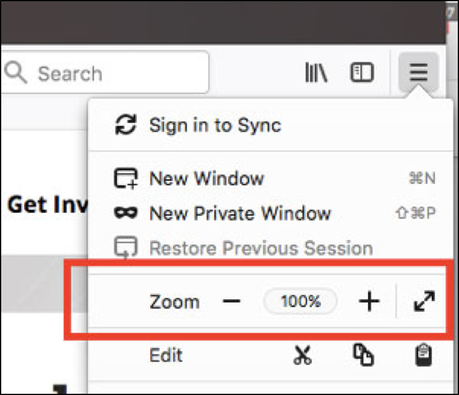
The zoom controls allow you to increase or decrease either the size of the whole web page or just the size of all the text, in order to improve readability.

Here is how you can zoom in and out of individual websites.


1.  Click the menu button on the right.  The customisation menu wil open and you will see the zoom controls at the
     top.
Picture
Use the + button to zoom in, and the - button to zoom out. The number in the middle is the current zoom level - click it to reset the zoom to 100%. 
 
Keyboard shortcuts: 
​You can also use the zoom controls without a mouse. Press and hold command while pressing + to zoom in, - to zoom out, or 0 to reset.
Powered by Create your own unique website with customizable templates.
  • INTRODUCTION
    • About Kenya
    • MOMBASA >
      • Then ...
      • Now ...
  • Top Tips
    • Consuls
    • Codes of Conduct ... >
      • Code of Conduct - on the Beach
      • Code of Conduct - on Safari
      • Code of Conduct - Etiquette
      • Code of Conduct - Shopping
    • Climate
    • Currency
    • Safety >
      • Be Cautious with Nature - on land
      • Be Cautious with Nature - at sea
      • How to avoid being stung
      • Water Safety
      • Cardipulmonary Resuscitation - CPR
      • Fire Safety
      • Should you trust a tail-wagging dog?
    • Kiswahili
    • Nothing to Declare
    • Public Holidays
    • Security - Personal
    • Tipping and Bargaining
    • Travel
    • Take the fear out of flying
  • Services
    • Electrics
    • Emergency Services
    • Car Hire
    • The Media
    • Post Office
    • Transport
  • Medical Care
    • Vital Statistics
    • Immunisation
    • Disease Risk Profile
    • Disease Transmissions
    • Disease Low-Down
    • Drugs
    • Mosquitoes >
      • Mosquito Trivia
      • Malaria
      • The Lariam Controversy
    • Solvents
    • Sensible Drinking
  • Things To Do ...
    • Things to do in Mombasa
    • Things to do all over Kenya
  • Animal + Environment Welfare
    • Wildlife Park Rules
    • National Parks